 |
| Intro to Data Structure & Algorithm | it2Edu |
Basic Terminology
- Data: Data can be defined as an elementary value or the collection of values.
- Group Items: Data items that have subordinate data items are called Group items.
- Record: Record can be defined as the collection of various data items.
- File: A File is a collection of various records of one type of entity.
- Attribute and Entity: An entity represents the class of certain objects. it contains various attributes. Each attribute represents the particular property of that entity.
- Field: Field is a single elementary unit of information representing the attribute of an entity.
Need of Data Structures
- Processor speed: To handle a very large amount of data, high-speed processing is required, but as the data is growing day by day to the billions of files per entity, the processor may fail to deal with that much amount of data.
- Data Search: Consider an inventory size of 106 items in a store, If our application needs to search for a particular item, it needs to traverse 106 items every time, resulting in slowing down the search process.
- Multiple requests: If thousands of users are searching the data simultaneously on a web server, then there are chances that a very large server can be failed during that process in order to solve the above problems, data structures are used. Data is organized to form a data structure in such a way that all items are not required to be searched and required data can be searched instantly.
Advantages of Data Structures
- Efficiency: The efficiency of a program depends upon the choice of data structures. For example: suppose, we have some data and we need to perform the search for a particular record. In that case, if we organize our data in an array, we will have to search sequentially element by element. hence, using an array may not be very efficient here. There are better data structures that can make the search process efficient like an ordered array, binary search trees, or hash tables.
- Reusability: Data structures are reusable, i.e. once we have implemented a particular data structure, we can use it at any other place. Implementation of data structures can be compiled into libraries that can be used by different clients.
- Abstraction: Data structure is specified by the ADT which provides a level of abstraction. The client program uses the data structure through interface only, without getting into the implementation details.
Data Structures & its types
- The data structure is a storage that is used to store and organize data.
- It is a way of arranging data on a computer so that it can be accessed and updated efficiently.
Note: Data structure and data types are slightly different. The data structure is the collection of data types arranged in a specific order.
1. Primitive Data Structure
- It is a predefined data structure.
- These data structures can be handled at machine-level instruction and we can't change or alter this.
- These data types can be used directly in the program for any specific task.
As for: int, char, string, float, pointer, double, etc.
2. Non-Primitive Data Structure
- These are user-defined data structures.
- Here the operation and functionality and operation are performed at the machine level only.
- These are using primitive data types to perform the task but the reverse is not happening.
As for: Arrays, Linked List, Trees, Graph, Stack, Queue, etc.
There are two types of Non-Primitive Data Structure
- A. Linear data structure
- B. Non-linear data structure
A. Linear Data Structures & it's types
- In linear data structures, the elements are arranged in sequence one after the other.
- Since elements are arranged in a particular order, they are easy to implement.
However, when the complexity of the program increases, the linear data structures might not be the best choice because of operational complexities. Different types of linear data structures are:
1. Array Data Structure
- Here elements in memory are arranged in continuous memory.
- All the elements of an array are of the same type.
- The type of elements that can be stored in the form of arrays is determined by the programming language.

2. Stack Data Structure
- Here elements are stored in the LIFO principle.
- That is, the last element stored in a stack will be removed first.
- It works just like a pile of plates, where the last plate kept on the pile will be removed first.
3. Queue Data Structure
- Unlike stack, the queue data structure works in the FIFO principle.
- It means the first element stored in the queue will be removed first.
- It works just like a queue of people at the ticket counter where the first person on the queue will get the ticket first.

4. Linked List Data Structure
- In a linked list data structure, data elements are connected through a series of nodes.
- Each node contains the data items and address to the next node.

B. Non-linear Data Structures & its types
Unlike linear data structures, elements in non-linear data structures are not in any sequence. Instead, they are arranged in a hierarchical manner where one element will be connected to one or more elements. Non-linear data structures are further divided into graph and tree-based data structures.
1. Graph Data Structure
- In the graph data structure, each node is called vertex and each vertex is connected to other vertices through edges.
Popular Graph-Based Data Structures:
- Spanning Tree and Minimum Spanning Tree
- Strongly Connected Components
- Adjacency Matrix
- Adjacency List
2. Trees Data Structure
- Similar to a graph, a tree is also a collection of vertices and edges.
- In the tree data structure, there can only be one edge between two vertices.
Popular Tree-based Data Structure:
- Binary Tree
- Binary Search Tree
- AVL Tree
- B-Tree
- B+ Tree
- Red-Black Tree

Difference between Tree and Graph
| Tree | Graph |
|---|---|
| It simulates a hierarchical tree structure, with a root value and subtrees of children with a parent node. | It consists of a group of vertices connected through edges |
| There is a root node | There are no root nodes |
| There are no loops | There can be loops |
| Represents data in the form of a tree structure, in a hierarchical manner | Represents data similar to a network |
| Two major types are binary tree and binary search tree | Two major types directed and undirected graphs |
| Less complex | Mole complex |
Linear Vs Non-linear Data Structures
| Linear Data Structures | Non-linear Data Structures |
|---|---|
| The data items are arranged in sequential order, one after the other. | The data items are arranged in non-sequential order (hierarchical manner). |
| All the items are present on the single layer. | The data items are present at different layers. |
| It can be traversed on a single run. That is, if we start from the first element, we can traverse all the elements sequentially in a single pass. | It requires multiple runs. That is, if we start from the first element it might not be possible to traverse all the elements in a single pass. |
| The memory utilization is not efficient. | Different structures utilize memory in different efficient ways depending on the need. |
| The time complexity increase with the data size. | Time complexity remains the same. |
| As for: Arrays, Stack, Queue | As for: Tree, Graph, Map |
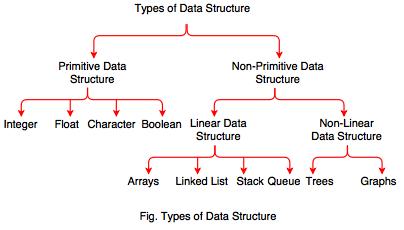 |
Diagram of Data Structure (DS) | it2Edu |
Operations of Data Structure
1) Traversing: Every data structure contains a set of data elements. Traversing the data structure means visiting each element of the data structure in order to perform some specific operation like searching or sorting.
Example: If we need to calculate the average of the marks obtained by a student in 6 different subject, we need to traverse the complete array of marks and calculate the total sum, then we will devide that sum by the number of subjects i.e. 6, in order to find the average.
2) Insertion: Insertion can be defined as the process of adding the elements to the data structure at any location.
If the size of data structure is n then we can only insert n-1 data elements into it.
3) Deletion: The process of removing an element from the data structure is called Deletion. We can delete an element from the data structure at any random location.
If we try to delete an element from an empty data structure then underflow occurs.
4) Searching: The process of finding the location of an element within the data structure is called Searching. There are two algorithms to perform searching, Linear Search and Binary Search. We will discuss each one of them later in this tutorial.
5) Sorting: The process of arranging the data structure in a specific order is known as Sorting. There are many algorithms that can be used to perform sorting, for example, insertion sort, selection sort, bubble sort, etc.
6) Merging: When two lists List A and List B of size M and N respectively, of similar type of elements, clubbed or joined to produce the third list, List C of size (M+N), then this process is called merging.
Why Data Structure?
- Knowledge about data structures helps you understand the working of each data structure.
- Based on that you can select the right data structures for your project.
- This helps you write memory and time-efficient code.
- To learn more about the importance of data structure, visit Why Learn Data Structure?
Algorithm
An algorithm is a set of well-defined instructions to solve a particular problem. It takes a set of inputs and produces the desired output.
For example, An algorithm to add two numbers:
- Take two number inputs
- Add numbers using the + operator
- Display the result
Why Learn Data Structures and Algorithms?
In this article, we will learn why every programmer should learn data structures and algorithms with the help of examples.
This article is for those who have just started learning algorithms and wondered how impactful it will be to boost their career/programming skills. It is also for those who wonder why big companies like Google, Facebook, and Amazon hire programmers who are exceptionally good at optimizing Algorithms.
What are Algorithms?
Informally, an algorithm is nothing but a mention of steps to solve a problem. They are essentially a solution.
For example, an algorithm to solve the problem of factorials might look something like this:
Problem: Find the
factorial of n
Initialize fact = 1
For every value v in range 1 to n:
Multiply the fact
by v
fact contains the factorial of n
Here, the algorithm is written in English. If it was written in a programming language, we would call it to code instead. Here is a code for finding the factorial of a number in C++.
int factorial(int n) {
int fact = 1;
for (int v = 1; v
<= n; v++) {
fact = fact *
v;
}
return fact;
}
Programming is all about data structures and algorithms. Data structures are used to hold data while algorithms are used to solve the problem using that data.
Data structures and algorithms (DSA) goes through solutions to standard problems in detail and gives you an insight into how efficient it is to use each one of them. It also teaches you the science of evaluating the efficiency of an algorithm. This enables you to choose the best of various choices.
Use of Data Structures and Algorithms to Make Your Code Scalable
Time is precious.
Suppose, Alice and Bob are trying to solve the simple problem of finding the sum of the first 1011 natural numbers. While Bob was writing the algorithm, Alice implemented it proving that it is as simple as criticizing Donald Trump.
Algorithm (by Bob)
Initialize sum = 0
for every natural number n in range 1 to 1011 (inclusive):
add n to sum
sum is your answer
Code (by Alice)
int findSum() {
int sum = 0;
for (int v = 1; v
<= 100000000000; v++) {
sum += v;
}
return sum;
}
Alice and Bob are feeling euphoric that they could build something of their own in almost no time. Let's sneak into their workspace and listen to their conversation.
Alice: Let's run this code and find out the sum.
Bob: I ran this code a few minutes back but it's still not
showing the output. What's wrong with it?
Oops, something went wrong! A computer is the most deterministic machine. Going back and trying to run it again won't help. So let's analyze what's wrong with this simple code.
Two of the most valuable resources for a computer program are time and memory.
The time taken by the computer to run code is:
Time to run code = number of instructions * time to execute each instruction
The number of instructions depends on the code you used, and the time taken to execute each code depends on your machine and compiler.
In this case, the total number of instructions executed (let's say x) are x = 1 + (10^11 + 1) + (10^11) + 1, which is x = 2 * 10^11 + 3
Let us assume that a computer can execute y = 108 instructions in one second (it can vary subject to machine configuration). The time taken to run the above code is
Time taken to run code = x/y (greater than 16 minutes)
Is it possible to optimize the algorithm so that Alice and Bob do not have to wait for 16 minutes every time they run this code?
I am sure that you already guessed the right method. The sum of first N natural numbers is given by the formula:
Sum = N * (N + 1) / 2
Converting it into code will look something like this:
int sum(int N) {
return N * (N + 1)
/ 2;
}
This code executes in just one instruction and gets the task done no matter what the value is. Let it be greater than the total number of atoms in the universe. It will find the result in no time.
The time taken to solve the problem, in this case, is 1/y (which is 10 nanoseconds). By the way, the fusion reaction of a hydrogen bomb takes 40-50 ns, which means your program will complete successfully even if someone throws a hydrogen bomb on your computer at the same time you ran your code. :)
Note: Computers take a few instructions (not 1) to compute multiplication and division. I have said 1 just for the sake of simplicity.
More on Scalability
Scalability is scale plus ability, which means the quality of an algorithm/system to handle the problem of larger size.
Consider the problem of setting up a classroom of 50 students. One of the simplest solutions is to book a room, get a blackboard, a few chalks, and the problem is solved.
But what if the size of the problem increases? What if the number of students increased to 200?
The solution still holds but it needs more resources. In this case, you will probably need a much larger room (probably a theater), a projector screen, and a digital pen.
What if the number of students increased to 1000?
The solution fails or uses a lot of resources when the size of the problem increases. This means, your solution wasn't scalable.
What is a scalable solution then?
- Consider a site like Khanacademy, millions of students can see videos, read answers at the same time and no more resources are required. So, the solution can solve the problems of larger size under resource crunch.
- If you see our first solution to find the sum of first N natural numbers, it wasn't scalable. It's because it required linear growth in time with the linear growth in the size of the problem. Such algorithms are also known as linearly scalable algorithms.
- Our second solution was very scalable and didn't require the use of any more time to solve a problem of larger size. These are known as constant-time algorithms.
Memory is expensive
Memory is not always available in abundance. While dealing with code/system which requires you to store or produce a lot of data, it is critical for your algorithm to save the usage of memory wherever possible. For example: While storing data about people, you can save memory by storing only their date of birth, not their age. You can always calculate it on the fly using their date of birth and current date.
Examples of an Algorithm's Efficiency
Here are some examples of what learning algorithms and data structures enable you to do:
Example 1: Age Group Problem
Problems like finding the people of a certain age group can easily be solved with a little modified version of the binary search algorithm (assuming that the data is sorted).
The naive algorithm which goes through all the persons one by one, and checks if it falls in the given age group is linearly scalable. Whereas, binary search claims itself to be a logarithmically scalable algorithm. This means that if the size of the problem is squared, the time is taken to solve it is only doubled.
Suppose, it takes 1 second to find all the people at a certain age for a group of 1000. Then for a group of 1 million people,
- the binary search algorithm will take only 2 seconds to solve the problem
- the naive algorithm might take 1 million seconds, which is around 12 days
- The same binary search algorithm is used to find the square root of a number.
Example 2: Rubik's Cube Problem
Imagine you are writing a program to find the solution of a Rubik's cube.
This cute looking puzzle has annoyingly 43,252,003,274,489,856,000 positions, and these are just positions! Imagine the number of paths one can take to reach the wrong positions.
Fortunately, the way to solve this problem can be represented by the graph data structure. There is a graph algorithm known as Dijkstra's algorithm which allows you to solve this problem in linear time. Yes, you heard it right. It means that it allows you to reach the solved position in a minimum number of states.
Example 3: DNA Problem
DNA is a molecule that carries genetic information. They are made up of smaller units which are represented by Roman characters A, C, T, and G.
Imagine yourself working in the field of bioinformatics. You are assigned the work of finding out the occurrence of a particular pattern in a DNA strand.
It is a famous problem in computer science academia. And, the simplest algorithm takes the time proportional to
(number of characters in DNA strand) * (number of characters in pattern)
A typical DNA strand has millions of such units. Eh! worry not. KMP algorithm can get this done in time which is proportional to
(number of characters in DNA strand) + (number of characters in pattern)
The * operator replaced by + makes a lot of change.
Considering that the pattern was of 100 characters, your algorithm is now 100 times faster. If your pattern was of 1000 characters, the KMP algorithm would be almost 1000 times faster. That is, if you were able to find the occurrence of pattern in 1 second, it will now take you just 1 ms. We can also put this in another way. Instead of matching 1 strand, you can match 1000 strands of similar length at the same time. And there are infinite such stories...
Final Words
- Generally, software development involves learning new technologies on a daily basis. You get to learn most of these technologies while using them in one of your projects. However, it is not the case with algorithms.
- If you don't know algorithms well, you won't be able to identify if you can optimize the code you are writing right now. You are expected to know them in advance and apply them wherever possible and critical.
- We specifically talked about the scalability of algorithms. A software system consists of many such algorithms. Optimizing any one of them leads to a better system.
- However, it's important to note that this is not the only way to make a system scalable. For example, a technique known as distributed computing allows independent parts of a program to run to multiple machines together making it even more scalable.
Virtu of Good Algorithms
- Input and output should be defined precisely.
- Each step in the algorithm should be clear and unambiguous.
- Algorithms should be the most effective among many different ways to solve a problem.
- An algorithm shouldn't include computer code. Instead, the algorithm should be written in such a way that it can be used in different programming languages.
- Algorithm to add two numbers
- Algorithm to find the largest among three numbers
- Algorithm to find all the roots of the quadratic equation
- Algorithm to find the factorial
- Algorithm to check prime number
- Algorithm of Fibonacci series
Asymptotic Analysis
- The study of change in performance of the algorithm with the change in the order of the input size is defined as asymptotic analysis.
- The efficiency of an algorithm depends on the amount of time, storage, and other resources required to execute the algorithm. The efficiency is measured with the help of asymptotic notations.
- An algorithm may not have the same performance for different types of inputs. With the increase in the input size, the performance will change.
Asymptotic Notations
- Asymptotic notations are the mathematical notations used to describe the running time of an algorithm when the input tends towards a particular value or a limiting value.
- For example: In bubble sort, when the input array is already sorted, the time taken by the algorithm is linear i.e. the best case.
- But, when the input array is in reverse condition, the algorithm takes the maximum time (quadratic) to sort the elements i.e. the worst case.
- When the input array is neither sorted nor in reverse order, then it takes average time. These durations are denoted using asymptotic notations. There are mainly three asymptotic notations:
- Big-O notation
- Omega notation
- Theta notation
Big-O Notation (O-notation)
- Big-O notation represents the upper bound of the running time of an algorithm. Thus, it gives the worst-case complexity of an algorithm.
O(g(n)) = { f(n): there exist positive constants c and n0
such that 0 ≤ f(n) ≤ cg(n) for all n ≥ n0 }
- The above expression can be described as a function f(n) belongs to the set O(g(n)) if there exists a positive constant c such that it lies between 0 and cg(n), for sufficiently large n.
- For any value of n, the running time of an algorithm does not cross the time provided by O(g(n)).
- Since it gives the worst-case running time of an algorithm, it is widely used to analyze an algorithm as we are always interested in the worst-case scenario.
Omega Notation (Ω-notation)
- Omega notation represents the lower bound of the running time of an algorithm. Thus, it provides the best case complexity of an algorithm.
- Omega gives the lower bound of a function
Ω(g(n)) = { f(n): there exist positive constants c and n0
such that 0 ≤ cg(n) ≤ f(n) for all n ≥ n0 }
- The above expression can be described as a function f(n) belongs to the set Ω(g(n)) if there exists a positive constant c such that it lies above cg(n), for sufficiently large n.
- For any value of n, the minimum time required by the algorithm is given by Omega Ω(g(n)).
Theta Notation (Θ-notation)
- Theta notation encloses the function from above and below. Since it represents the upper and the lower bound of the running time of an algorithm, it is used for analyzing the average-case complexity of an algorithm.
- Theta bounds the function within constants factors
- For a function g(n), Θ(g(n)) is given by the relation:
Θ(g(n)) = { f(n): there exist positive constants c1, c2 and n0
such that 0 ≤ c1g(n) ≤ f(n) ≤ c2g(n) for all n ≥ n0 }
- The above expression can be described as a function f(n) belongs to the set Θ(g(n)) if there exist positive constants c1 and c2 such that it can be sandwiched between c1g(n) and c2g(n), for sufficiently large n.
- If a function f(n) lies anywhere in between c1g(n) and c2g(n) for all n ≥ n0, then f(n) is said to be asymptotically tight bound.

Efficiencies of the Algorithm
- Best case
- Worst case
- Average case
Let we have 5 nos. (n=5)25, 31,42,71,105, and we have to find any element in the list.
Best Case
Best case = fastest time to complete, with optimal inputs chosen. For example, the best case for a sorting algorithm would be data that's already sorted. Worst case = slowest time to complete, with pessimal inputs chosen
Worst Case
In computer science, the worst-case complexity (usually denoted in asymptotic notation) measures the resources (e.g. running time, memory) that an algorithm requires given an input of arbitrary size (commonly denoted as n or N). It gives an upper bound on the resources required by the algorithm.
Average Case
In computational complexity theory, the average-case complexity of an algorithm is the amount of some computational resource (typically time) used by the algorithm, averaged over all possible inputs.
Operations in order of worth | Asymptotic Notations
Similar to big O notation, the big Omega(Ω) function is used in computer science to describe the performance or complexity of an algorithm. If a running time is Ω(f(n)), then for large enough n, the running time is at least k⋅f(n) for some constant k
- Big 'O' (Oh)
- Big Omega
- Big Theta
Big-O
- It is a measure of the longest amount of time it could possibly take for the algorithm to complete.
- It represents the max time that the algorithm takes for it is execution.;
- The growth rate of f(n) is not less than the growth rate of g(n)
- f(n)<-O[g(n)]
Big- Ω
- It takes a small amount of time as compare to Big-O it could possibly take for the algorithm to complete.
Big- Θ
- It takes a very short amount of time as compare to Big-O and Big-?

Time Complexity
The time complexity of an algorithm quantifies the amount of time taken by an algorithm to run as a function of the length of the input. Note that the time to run is a function of the length of the input and not the actual execution time of the machine on which the algorithm is running on.
Space Complexity
The space complexity of an algorithm quantifies the amount of space taken by an algorithm to run as a function of the length of the input. Consider an example: Suppose a problem to find the frequency of array elements.
Master Theorem
Master Theorem
In this tutorial, you will learn what master theorem is and how it is used for solving recurrence relations.
The master method is a formula for solving recurrence relations of the form:
T(n) = aT(n/b) + f(n),
where,
n = size of input
a = number of subproblems in the recursion
n/b = size of each subproblem. All subproblems are assumed
to have the same size.
f(n) = cost of the work done outside the recursive call,
which includes the cost of dividing the problem and
cost of merging the solutions
Here, a ≥ 1 and b > 1 are constants, and f(n) is an asymptotically positive function.
An asymptotically positive function means that for a sufficiently large value of n, we have f(n) > 0.
The master theorem is used in calculating the time complexity of recurrence relations (divide and conquer algorithms) in a simple and quick way.
Master Theorem
If a ≥ 1 and b > 1 are constants and f(n) is an asymptotically positive function, then the time complexity of a recursive relation is given by
T(n) = aT(n/b) + f(n)
where, T(n) has the following asymptotic bounds:
2. If f(n) =
Θ(nlogb a), then T(n) = Θ(nlogb a * log n).
3. If f(n) =
Ω(nlogb a+ϵ), then T(n) = Θ(f(n)).
ϵ > 0 is a constant.
Each of the above conditions can be interpreted as:
- If the cost of solving the sub-problems at each level increases by a certain factor, the value of f(n) will become polynomially smaller than nlogb a. Thus, the time complexity is oppressed by the cost of the last level ie. nlogb a
- If the cost of solving the sub-problem at each level is nearly equal, then the value of f(n) will be nlogb a. Thus, the time complexity will be f(n) times the total number of levels ie. nlogb a * log n
- If the cost of solving the subproblems at each level decreases by a certain factor, the value of f(n) will become polynomially larger than nlogb a. Thus, the time complexity is oppressed by the cost of f(n).
Solved Example of Master Theorem
T(n) = 3T(n/2) + n2
Here,
a = 3
n/b = n/2
f(n) = n2
logb a = log2 3 ≈ 1.58 < 2
ie. f(n) < nlogb a+ϵ , where, ϵ is a constant.
Case 3 implies here.
Thus, T(n) = f(n) = Θ(n2)
Master Theorem Limitations
The master theorem cannot be used if:
- T(n) is not monotone. eg. T(n) = sin n
- f(n) is not a polynomial. eg. f(n) = 2n
- a is not a constant. eg. a = 2n
- a < 1